
QR ordering
QR code menu and table ordering system
The menu is already at the table
A QR code menu ordering system with one code per table. Guests browse in their language, order in rounds, call a waiter or ask for the bill, without an app and without waving.
- 01
A menu from a photo
Photograph your printed menu and the items, prices and categories are read into the system. Fix what needs fixing and publish.
Included inEssentialGrowthPro
- 02
Dine-in, pickup and delivery
The same menu serves a table code, a takeaway counter and a delivery address, with the delivery zone and minimum checked before the order lands.
Included inGrowthPro
- 03
Call waiter, request bill
Two taps on the guest side, one request on the POS floor. Requests are rate-limited so a table cannot flood the pass.
How to start
What you do in the back office to switch it on.
- Add your tables and their seats.
- Print the QR code for each table.
- Finish the setup checklist and open the restaurant.
Good for
How it works
Picture a guest who sits at table 4 on a busy evening and wants to order without waiting for a menu.
- The guest scans the QR code printed for table 4. The restaurant menu opens in the browser, in a language the restaurant offers, with no app to install.
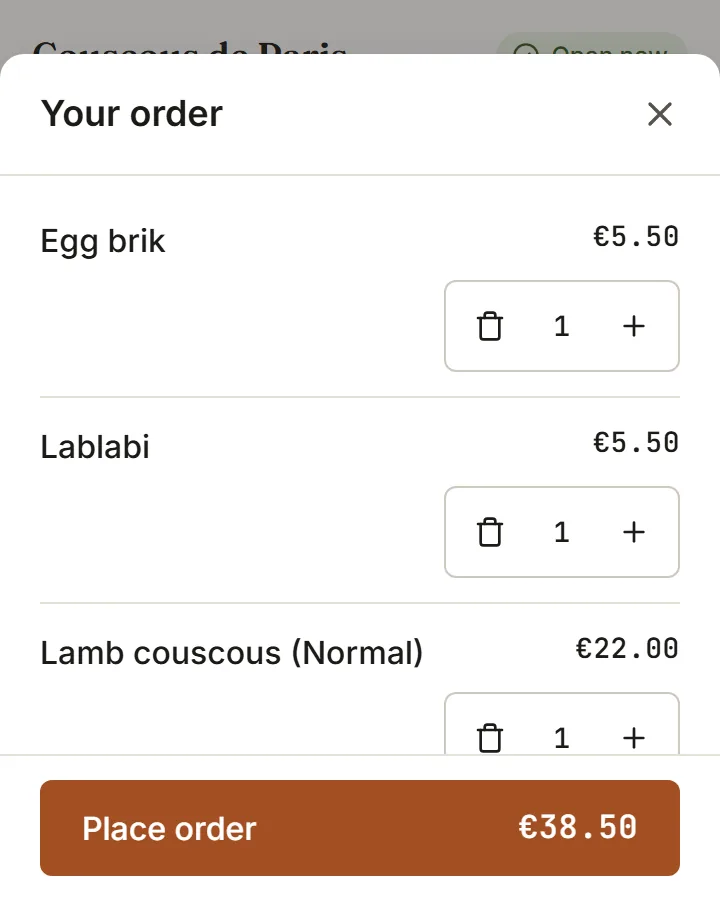
- The guest adds dishes and sends the order. It is tied to the table and arrives on the orders board and the kitchen, or waits for staff to accept it if auto-accept is off.
- Later, the guest can order another round, call a waiter or ask for the bill from the same page. The request shows up for staff on the floor.
- When the table is ready to pay, staff settle the bill at the POS. If the restaurant has turned on paying at the table, the guest can also pay from the phone.
What you need
- Guests need a phone with a camera or QR reader and a mobile browser. No account and no app are needed.
- The guest needs a mobile or wifi connection to see the menu and place an order. The page does not take orders offline.
- You need a published menu and your tables added in the admin area, then the QR codes printed. Posters and table cards come in A4, A5 and table tent sizes.
What it does not do
- Rotating a table QR code makes every printed card for that table stop working, so they must be reprinted.
- Waiter and bill requests are limited per table, so repeated taps do not flood the staff. A guest may need to wait a minute before sending another.
- Paying from the phone at the table depends on your plan and payment setup. Which plans include it is listed on this page.
Questions owners ask
Works with
Try it on your own menu
7-day free trial on every plan. No card. Cancel anytime.