Kitchen display
Tickets on a screen, not on a rail
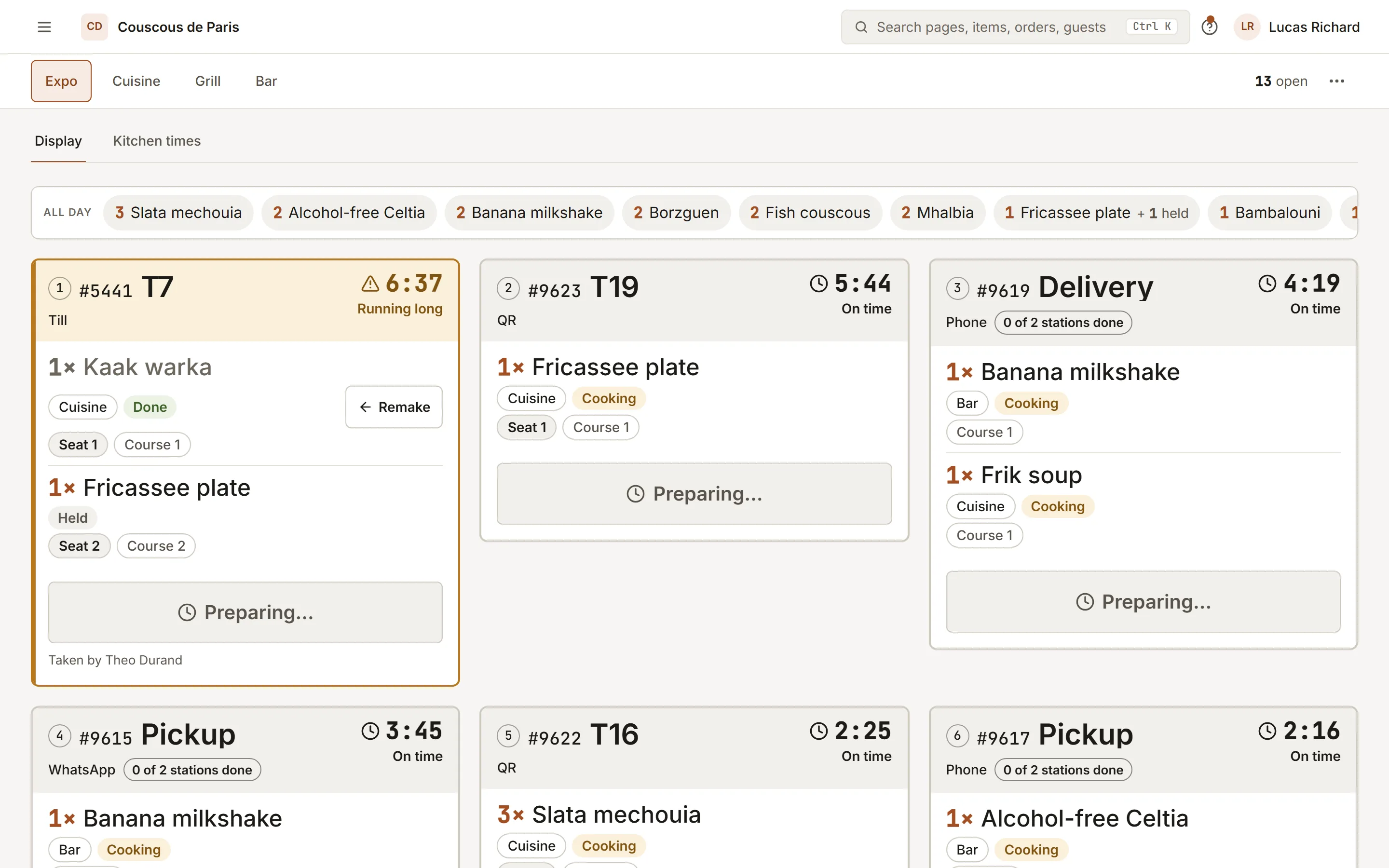
Every order lands on the right station the moment it is sent. Cooks bump what is ready, the expo sees the whole picture, the floor sees when to run it.
Included inEssentialGrowthPro
- 01
One screen per station
Grill, cold, pastry: each station shows only its items, with the course and the table. The expo view shows every ticket and the station load.
- 02
Bump and serve
Bump marks an item ready; serve marks it delivered. The oldest ticket is always first, and its age is on the card.
- 03
Allergy notes stay on the ticket
A note from the guest travels with the item to the station that cooks it, flagged so it cannot be missed on a busy night.
How to start
What you do in the back office to switch it on.
- Add your kitchen stations, such as grill, cold and pastry.
- Give each category or dish its station.
- Open the kitchen display on each station’s screen.
Good for
Works with
Try it on your own menu
7-day free trial on every plan. No card. Cancel anytime.