
Delivery
Restaurant delivery management software
Your drivers, your zones, your margin
Delivery software for restaurants that use their own drivers: draw the areas you deliver to, set a fee and a minimum for each, and dispatch to drivers on your roster. No platform commission in the middle.
- 01
Zones with a fee and a minimum
Each zone has its own delivery fee, minimum order and typical time. Guests choose their area at checkout and see the fee before they confirm.
- 02
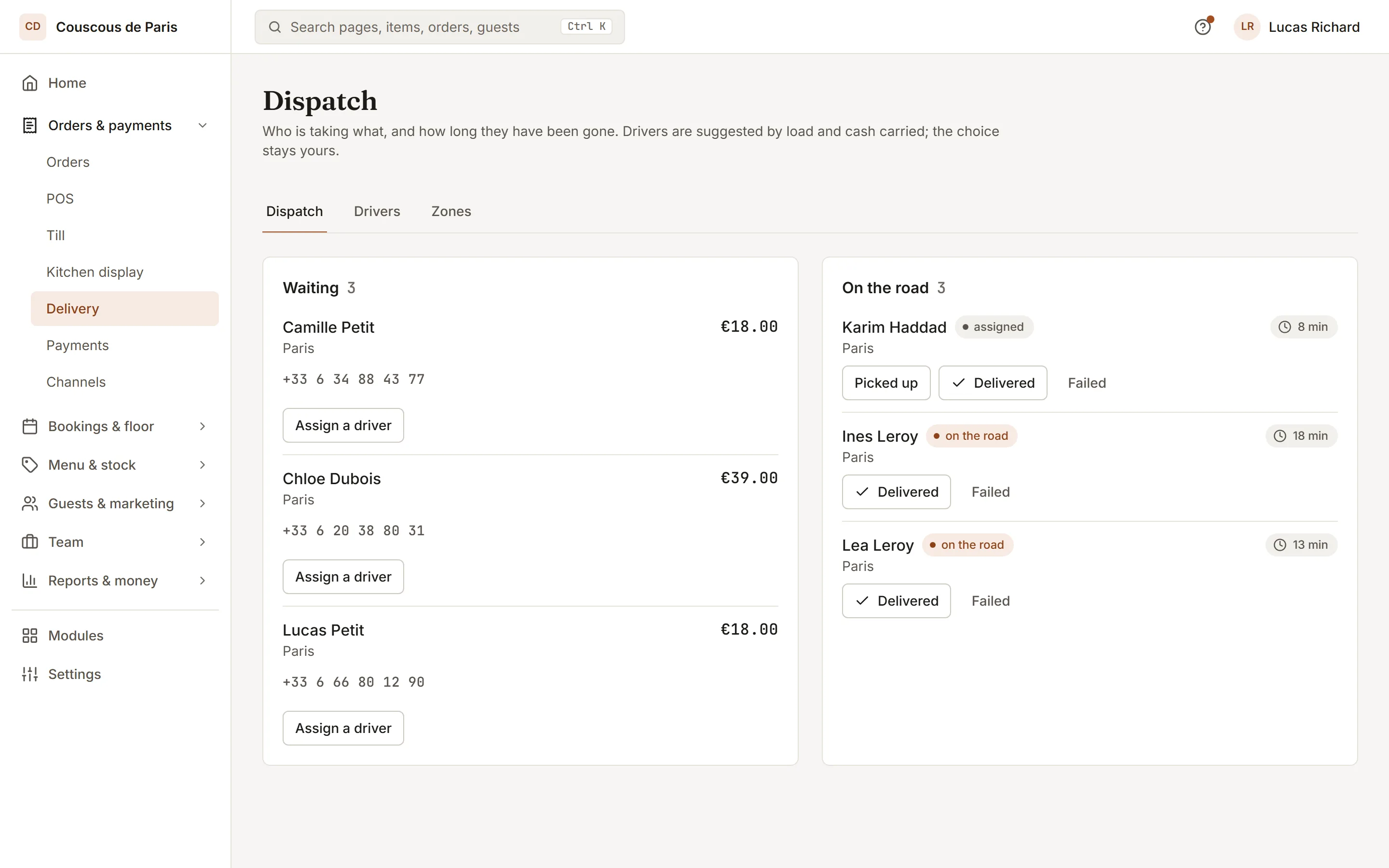
Dispatch to the right driver
See who is free, out or on a break. The board suggests a driver first, and tracks the order from picked up to delivered.
- 03
Cash on the road
Each driver has a cash limit and a running amount carried. Take cash at the end of a run and the movement is recorded against the driver.
How to start
What you do in the back office to switch it on.
- Turn on delivery orders.
- Draw each zone with its fee and minimum order.
- Add your drivers, each with a cash limit.
Good for
How it works
Take a Saturday evening of delivery orders with two drivers on your own roster.
- You switch on delivery orders, then add zones with a name, a delivery fee, a minimum order and a typical time. You add each driver with an optional cash limit.
- A guest orders for delivery, chooses their area by name, and sees the fee before confirming. If they pay on delivery, the order shows the cash to collect.
- On the dispatch board you assign the order to a driver. If the driver would go over their cash limit, the assignment is refused. You mark it picked up when the driver leaves.
- The driver delivers and you mark it delivered, or failed if nobody answers. Cash collected is recorded against the driver until you take it at the counter.
What you need
- Delivery is a plan feature. Which plans include it is listed on this page. Delivery orders also need to be switched on in your ordering settings.
- Dispatch is done in the admin by staff with the service role. Adding drivers and recording their cash needs the settings role.
- Live position needs a driver who is a team member with a phone browser and location permission, and who turns sharing on from the dispatch page.
What it does not do
- Delivery covers your own drivers. It does not supply couriers.
- A driver's position is shared only while they switch it on, and only their own phone can share it. Without sharing, guests see the order status but no map position.
- You assign each order to a driver yourself from the board. Delivery does not plan routes between stops.
Questions owners ask
Works with
Try it on your own menu
7-day free trial on every plan. No card. Cancel anytime.